
The player, properly.
The bar at the foot of every page is a working Winamp-style player carrying the site's own album — seven songs, two takes of most. It plays one track after another, keeps playing as you move between pages, and dresses in any of its colourways.
Playing music
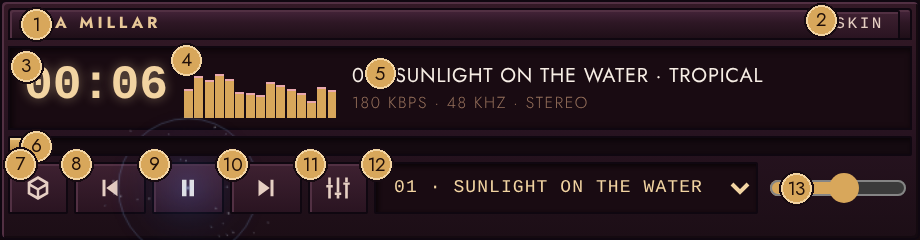
- 1Title bar — drag to float the player; double-click to re-dock
- 2SKIN — opens the colourway tray (figure 4)
- 3Time counter
- 4Level meter — dances while music plays
- 5Now playing — long titles scroll
- 6Seek bar — click to jump within the track
- 7Track list — opens the playlist (figure 2)
- 8Previous track
- 9Play and pause
- 10Next track
- 11Equaliser — opens the EQ panel (figure 3)
- 12Track menu — pick any track directly
- 13Volume
| ▶ / ⏸ | Play and pause. The time counter and the meter run while music plays. |
| ⏮ ⏭ | Previous and next track. |
| Seek bar | Click anywhere along it to jump within the track. |
| Volume | The slider at the right of the bar (desktop widths). |
| Track menu | The drop-down picks any track directly. |
When a track ends, the next one starts by itself; after the last track the album starts again from the top. Leave a page mid-song and the next page picks up exactly where the music left off.
Phone locked? The current track, artwork and transport controls appear on the lock screen, so the music can be driven without unlocking.
The track list
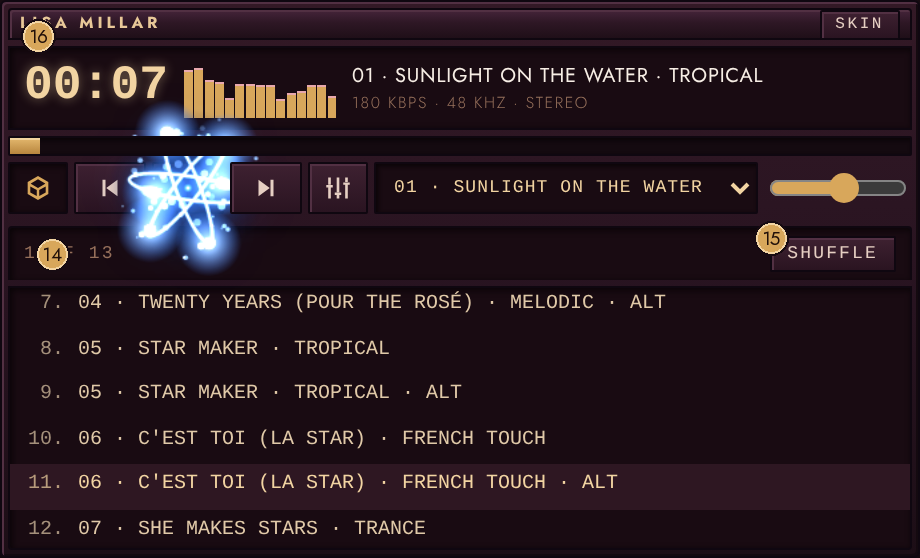
- 14Position — where you are in the album (1 OF 13)
- 15SHUFFLE — jumps to a random track
- 16The playing row is highlighted — click any row to play it
The small cube at the left of the bar opens the playlist window: every track, numbered,
with the one playing highlighted. Click any row to play it. The header shows where you
are in the list — 3 OF 13 — and SHUFFLE jumps to a random track that is not
already playing.
The equaliser
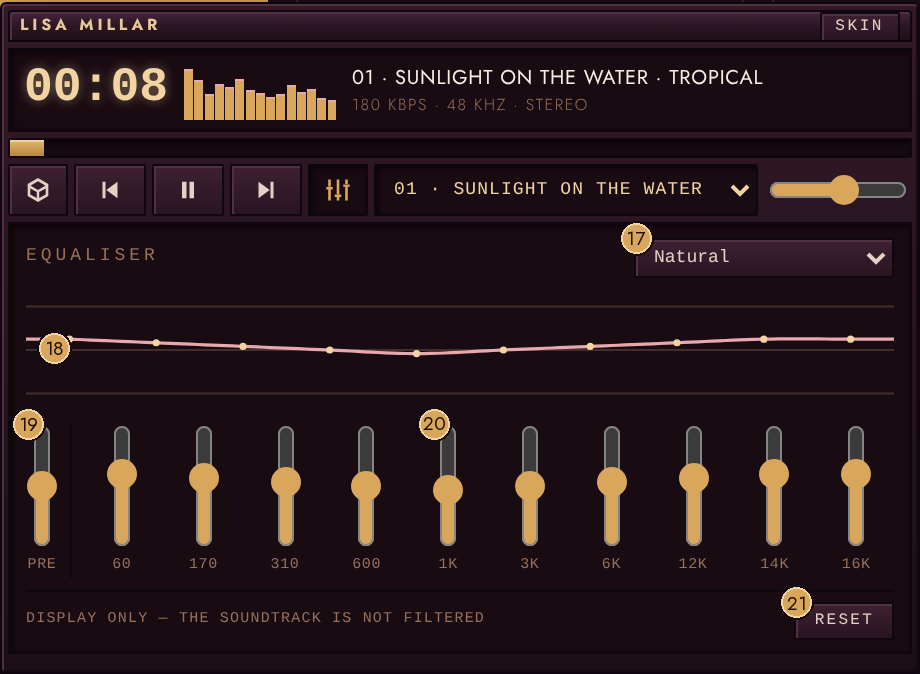
- 17Preset menu — Winamp's classics, Flat to Full Bass and Treble
- 18Response curve — redraws as the sliders move
- 19Preamp slider
- 20Ten band sliders, 60 Hz to 16 kHz
- 21Reset — back to Flat
The sliders button opens a classic ten-band equaliser with Winamp's own preset list, from Flat to Full Bass & Treble. Drag the sliders and the response curve redraws; the meter leans to match. One honest note, printed on the panel itself: it is a display, not a filter — the soundtrack itself is not re-equalised, because routing the audio through a processing graph breaks playback on iPhones.
Skins — dressing the player
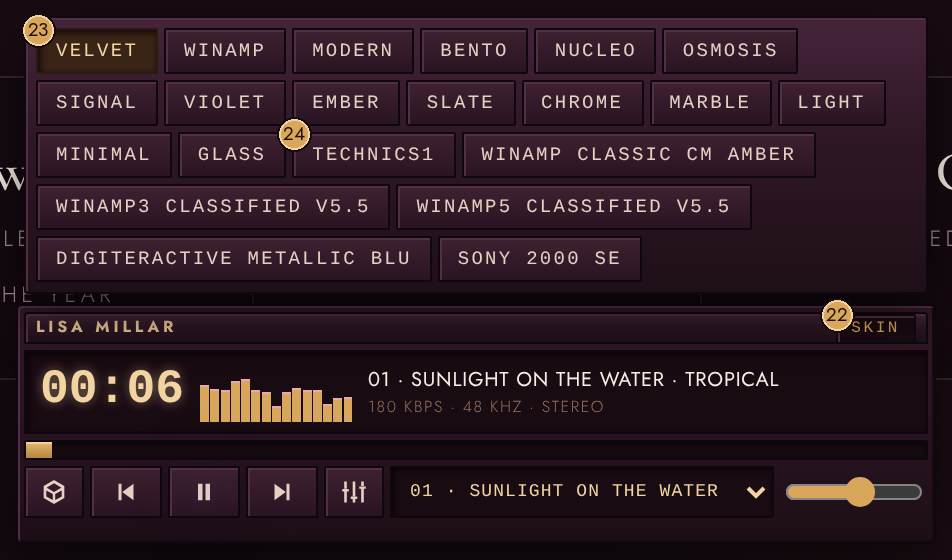
- 22SKIN — tap again to close the tray
- 23Velvet — the house colourway and the default
- 24A custom skin, generated from an uploaded Winamp .wsz file
SKIN, on the player's title bar, opens the colourway tray. Velvet — the site's own
plum-and-champagne — is the default; the classic Winamp green, Nucleo, Bento and the
rest of the family are one tap away, alongside any custom skins added by the
administrator from uploaded Winamp .wsz files. Your choice is remembered on
your device.
Moving the player
On a desktop, drag the title bar and the whole chassis floats wherever you drop it — the position is remembered. Double-click the title bar to send it back to its dock at the foot of the page. On phones the player stays docked full-width.
Sound effects
The clicks, sweeps and the implosion gong around the orbital animations are generated live in the browser — there are no sound files. Phones unlock audio on the first touch; if a phone stays silent, tap the splash screen, the logo or the menu button once.